Document Register
The Document Register is used to manage all job-related documents including plans, drawings, forms, and other attachments.
It provides version control, document tracking, and distribution management to ensure all project stakeholders are working from the latest information.
It provides version control, document tracking, and distribution management to ensure all project stakeholders are working from the latest information.
Index Screen Overview
- Central repository for all project documents
- Supports version control and document history
- Allows uploading and importing of plans
- Tracks distribution and document usage
This screen ensures document consistency and control across the project lifecycle.
Toolbar Actions
- Upload – Add files via drag-and-drop or browse
- New – Create a new document record
- Create New Version – Create a new version of an existing document
- Edit – Edit selected document details
- Delete – Remove selected document (latest versions only)
- Refresh – Reload the document list
- Search – Filter documents by keyword
- Show Latest Version – Toggle to display only current versions
These controls allow users to manage document records efficiently.

Document Grid – Field Definitions
- Title – Name of the document.
- Document Type – Category of document (e.g. drawing, form, map).
- Description – Additional details describing the document.
- Version – Version number of the document.
- Auto Attach? – Indicates if the document is automatically attached to communications (e.g. emails).
- By – User who created or last modified the document.
- Date Created – Date and time the document was created.
- Map / Link – External or internal reference link if applicable.
- Is Latest – Indicates whether this is the most recent version.
- Attachments – File(s) associated with the document (download/view).
- Distribution Stats – Shows document usage metrics: (sent count, viewed count, download count, distribution count).
These fields define the document structure and version tracking within the register.

Plan Upload & Import Process
- Upload files via drag-and-drop or file browser
- Supports multiple file types (PDF, DWG, Excel, images, etc.)
- Uploaded files are staged before import
- Users can review and edit metadata before final import
This ensures documents are validated before being added to the register.
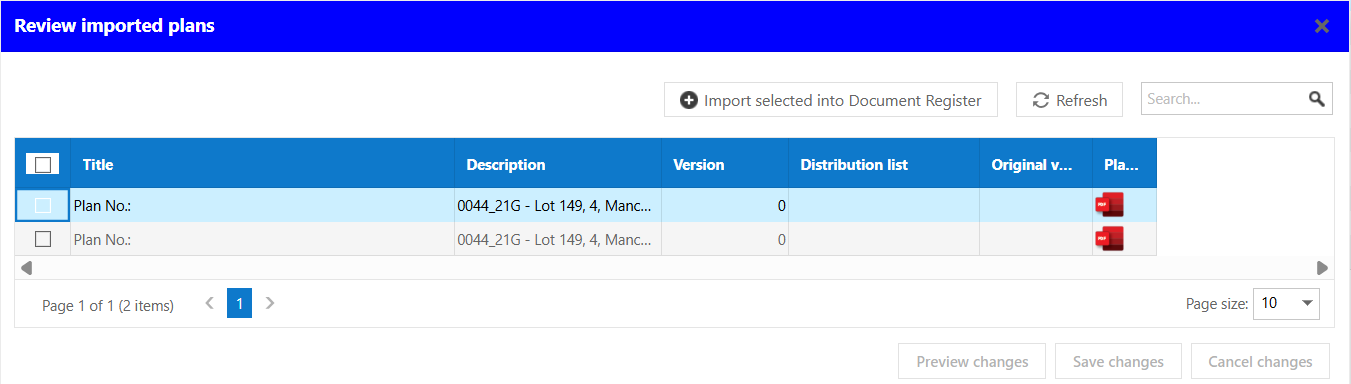
Import Review Screen
After uploading, documents appear in a review popup before being imported.
- Select – Choose which documents to import.
- Title – Name assigned to the document.
- Description – Description of the document.
- Version – Version number.
- Distribution List – Displays any existing distribution list
- Original Version – Indicates if document originates from previous version.
- Plan Attached – Shows uploaded file association.
Users can make adjustments before finalising the document import.
Behaviour & Functionality
- Supports version control and historical tracking
- Double-click opens document for editing
- Attachments can be downloaded directly
- Grid supports sorting, filtering, and paging
- Latest version filtering improves visibility
The system ensures users access the correct document version.
Tips
- Always work with the latest version to avoid errors
- Use clear naming conventions for documents
- Maintain accurate descriptions for easy searching
- Review distribution statistics to track document usage
- Use versioning instead of overwriting files
- Validate metadata before importing plans
Was this article helpful?
That’s Great!
Thank you for your feedback
Sorry! We couldn't be helpful
Thank you for your feedback
Feedback sent
We appreciate your effort and will try to fix the article