Document Register Edit Screen
The Document Register Edit screen is used to create, update, and manage individual document records.
It provides a tabbed interface for editing document details and reviewing activity history.
It provides a tabbed interface for editing document details and reviewing activity history.
Tabs Overview
- Details
- Activity Log
The last selected tab is remembered to improve user workflow.
Details Tab – Field Definitions
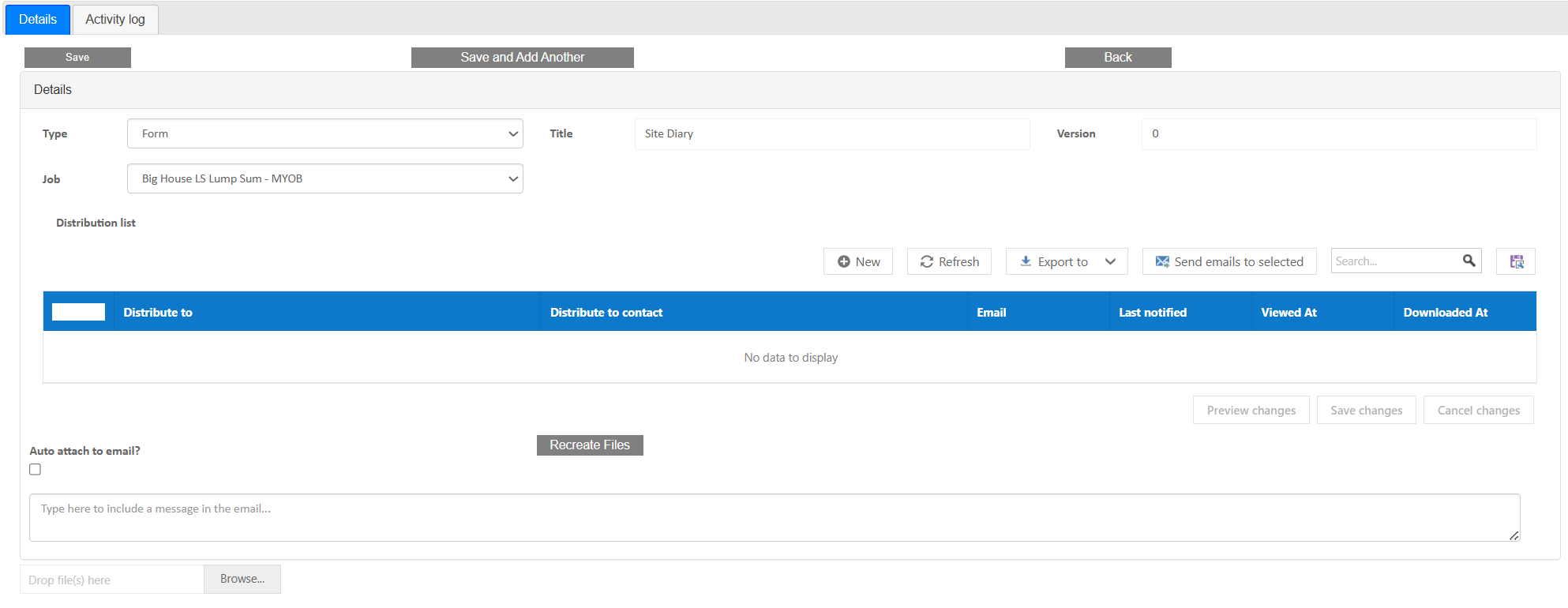
The Details tab is used to define and maintain document information.
- Document Type – Classification of the document (e.g. drawing, form, map).
- Title – Name of the document used for identification.
- Version – Numeric version of the document used for tracking revisions.
- Distribution List – List of recipients who will receive the document when distributed. Also shows user when a document was sent, viewed or downloaded.
- Auto Attach to Email – Determines if the document is automatically included in outgoing communications.
- Files/Show current – Shows current and past versions of the documents depending on check box status
- Notes – Any associated notes entered by the user
- Recreate Files - recreates files for any times there has been an update that needs to be reflected on latest version
This tab manages the structure, classification, and versioning of documents within the system.
Activity Log Tab
The Activity Log tab records actions taken on the document.
- Document creation events
- Edits and updates
- Version changes
- User activity tracking
- Date and time stamps
This provides an audit trail for document history and compliance.
Tips
- Use consistent naming conventions for documents
- Always increment version when updating files
- Ensure correct document type is selected
- Verify distribution lists before sending
- Review Activity Log for audit purposes
Was this article helpful?
That’s Great!
Thank you for your feedback
Sorry! We couldn't be helpful
Thank you for your feedback
Feedback sent
We appreciate your effort and will try to fix the article