Extension (EOT) Edit Screen
The Extension Edit screen is used to create, review, and manage Extensions of Time (EOT) for a job. It allows users to document delays, adjust project timelines, and track approvals.
Available tabs include: Details, Notes, and Activity Log.
Screen Overview
The Extension Edit screen is accessed from the Extensions Register and is linked to a specific job and extension record.
- Displays the selected job and extension context
- Used to manage programme impacts and delays
- Integrated with the main job navigation menu
Details Tab
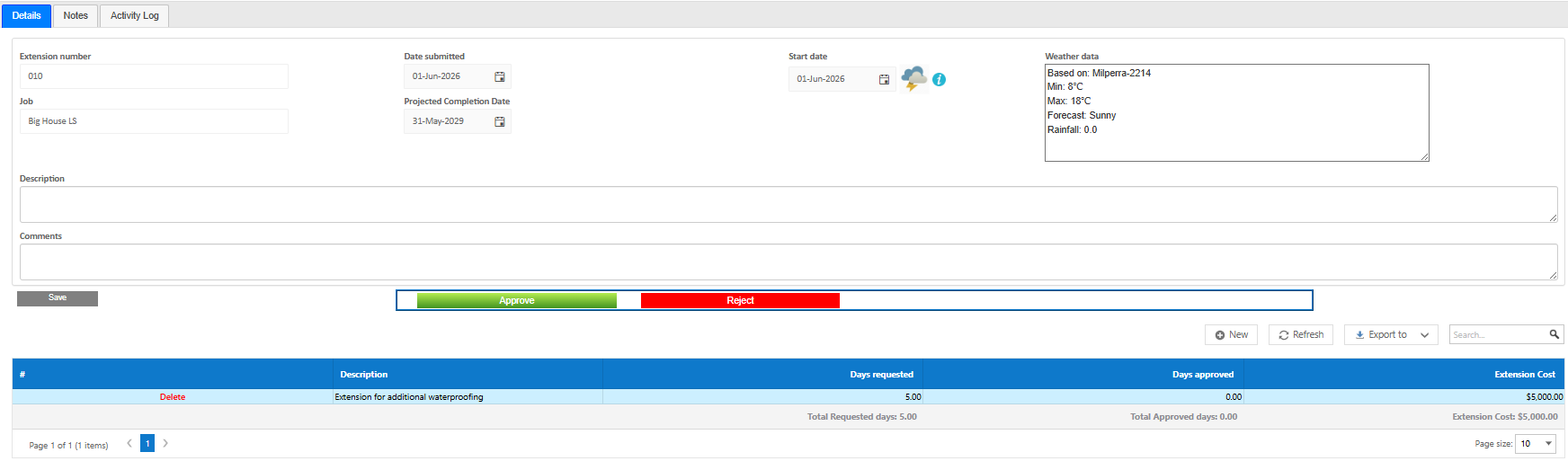
The Details tab is the main working area for the extension.
- Extension number (EOT reference)
- Reason for delay
- Start and end dates affected
- Number of days claimed
- Revised completion dates
- Status and approval tracking
- Weather tracking
This tab defines how the extension affects the project programme and timeline. Extensions can be left here awaiting approval until such time a user is ready to apply to the job officially.
Notes Tab
The Notes tab captures supporting information.
- Internal comments
- Clarifications or supporting details
- Communication history
- Attachments
Helps provide context for reviewing and approving extensions.
Activity Log Tab
The Activity Log tab provides a complete audit trail.
- Changes to extension details
- User actions
- Status updates
- Timestamps of all activity
Essential for tracking the history of delays and approvals.
Navigation & Workflow
- Access via the Extensions Register
- Edit extension details and save changes
- Return to the register to manage other records
- Navigate to other job modules via the module menu
The workflow ensures extensions are managed as part of the overall project lifecycle.
Tips
- Ensure delay reasons are clearly documented
- Keep dates accurate to reflect programme impact
- Use Notes to support approval decisions
- Review Activity Log for audit and dispute resolution
- Align extensions with related variations where applicable
``
Was this article helpful?
That’s Great!
Thank you for your feedback
Sorry! We couldn't be helpful
Thank you for your feedback
Feedback sent
We appreciate your effort and will try to fix the article