Job Cost Breakdown / Forecast Grid
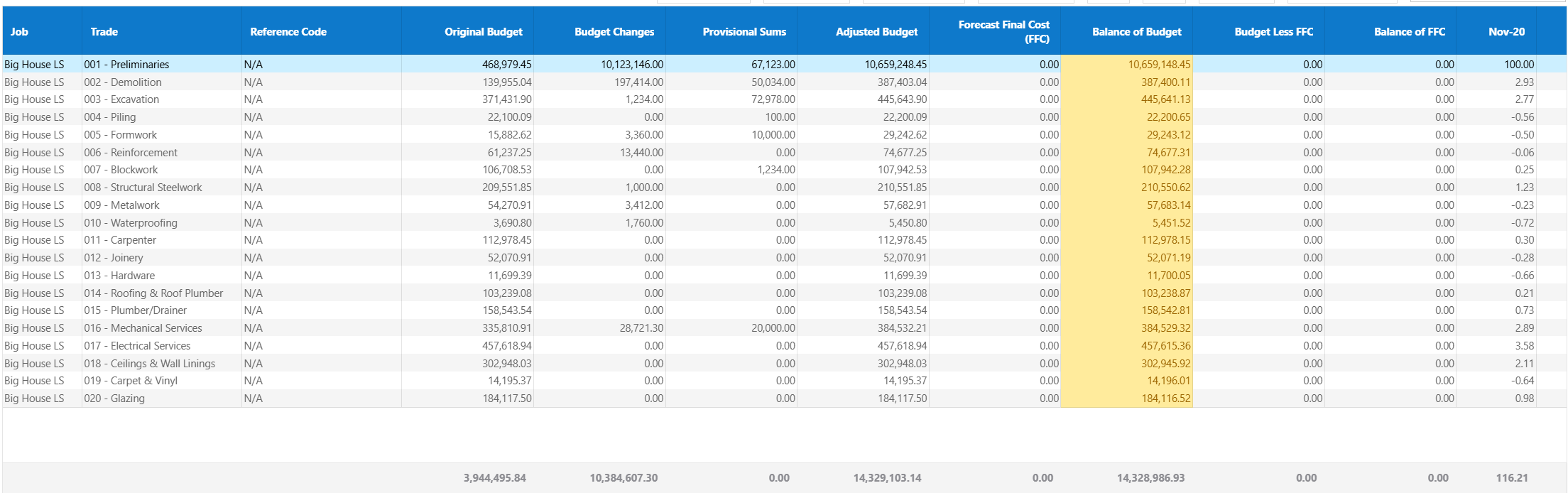
This screen provides a highly detailed breakdown of job costs, budgets, and forecasts across trades and cost codes over time.
It is used for deep financial analysis, cost tracking, and long-term forecasting at a granular level.
Data Structure
The grid is structured in multiple hierarchical levels:
- Job – Top-level project
- Trade – Cost grouping (e.g. Preliminaries)
- Cost Code – Individual cost items (e.g. Site Manager, Labour)
Users can expand and collapse sections to drill into detail or view summaries. Income can be viewed by either trade or claim stage depending on system settings.
Control
- Show/Hide Detail – Hide detail to give user more real estate on the screen when entering data
- Save/Preview/Cancel Changes – Save or cancel any changes
- Paste From Clipboard - A user can copy and paste directly from and excel sheet into the cash flow grid itself
- Copy Down - Click into a field, enter data and hit this button to copy that data to all rows below
- Refresh - Update any data in the table below, save any changes to column width and page size settings
- Export to - Export table data to various outputs

Time-Based Forecasting Grid
The grid spans multiple months and years over the jobs full period, a user can set how many months show on the cash flow after the job end date in system settings 'others' tab.
- Includes historical and future months
- Supports long-term forecasting (multi-year)
- Each month contains Budget, Actual, Invoice, and Order values
This enables full lifecycle financial tracking of the project.

Interpreting the Grid
- Compare Budget vs Actual to identify overruns
- Review Orders to understand committed future costs
- Track Invoice Received for cash flow impact
- Assess future months for forecasting accuracy
The grid is designed for detailed financial analysis and decision-making.
Tips
- Focus on high-value Trades/cost codes first
- Regularly review future months for forecast accuracy
- Use filtering to isolate problem areas
- Monitor trends rather than single-month values
Was this article helpful?
That’s Great!
Thank you for your feedback
Sorry! We couldn't be helpful
Thank you for your feedback
Feedback sent
We appreciate your effort and will try to fix the article