Cash Flow Summary Page
The Cost to Complete screen provides a detailed financial view of a job, including budgets, actual costs, commitments, and future forecasts. It allows users to analyse project performance over time and predict final outcomes based on current data.
Job Selection Panel
Users can select one or multiple jobs for analysis.
- Job Number – Unique job identifier
- Search and filter functionality

Financial Summary Section
Displays the overall financial position of the selected job(s).
- Income – Total project revenue
- Expenses – Total project costs
This section provides a quick snapshot of project performance.
Budget Breakdown Columns
The system calculates and displays multiple budget layers.
- Original Budget – Initial planned budget
- Budget Changes – Adjustments made over time
- Provisional Sums – Allowances for uncertain costs
- Adjusted Budget – Updated total budget
- Commitments – Approved and committed costs
- Allocation Balance – Remaining available budget
These columns form the basis of cost control and tracking.

Time-Based Forecasting
The system tracks budgets and costs across a monthly timeline scroll across in the summary view to check the forecast for each month.
- Monthly columns
- Long-term forecasting visibility (multi-year)
- Historical and future projections combined
Each month is broken down into multiple data points behind the scenes, a user can check these breakdowns by hitting edit income or edit expenses.
Key Actions & Buttons
- Refresh – Reload data when electing new jobs or historical data points
- View Report – View data in a report view that can be filtered and exported
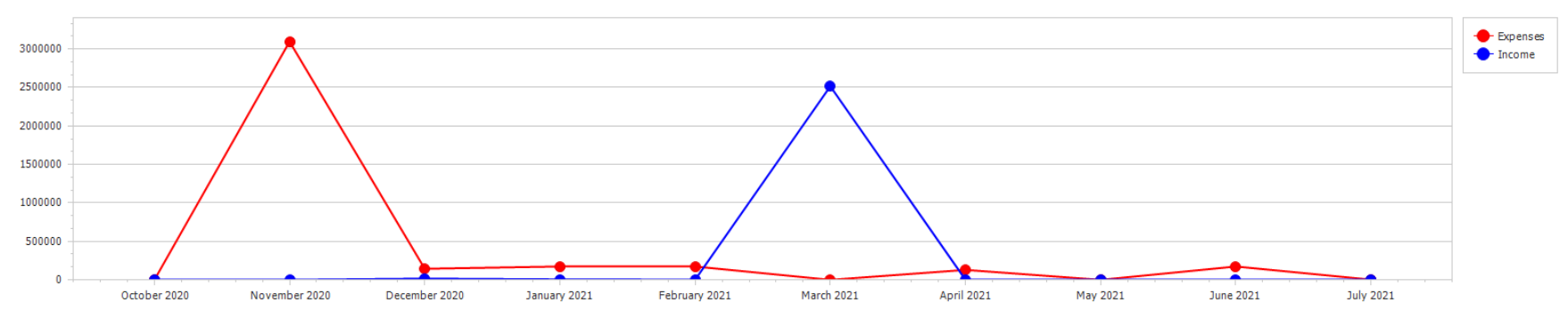
- View Chart - Display data in a chart view for a quick summary overview
- Edit Income – Update revenue forecasts and check behind the scenes numbers
- Edit Expenses – Adjust cost forecasts and check numbers behind the scenes
- Export – Export data to external formats (Report view)
Users can modify forecasting data directly from this screen.
Visual Reporting
Includes graphical representation of key financial metrics.
- Grand Total vs Budget comparison
- Income vs Budget charts
Charts provide high-level insights into performance trends.
Tips
- Regularly update forecasts to maintain accuracy
- Monitor allocation balance to prevent overruns
- Use trade breakdowns to identify problem areas
- Review future months for cash flow planning
- Export reports for financial reviews and stakeholders
Was this article helpful?
That’s Great!
Thank you for your feedback
Sorry! We couldn't be helpful
Thank you for your feedback
Feedback sent
We appreciate your effort and will try to fix the article