Defect Edit Screen
The Defect Edit screen is used to create, manage, and resolve defects identified during a project
It provides a structured process for assigning responsibility, tracking progress, and documenting resolution.
It provides a structured process for assigning responsibility, tracking progress, and documenting resolution.
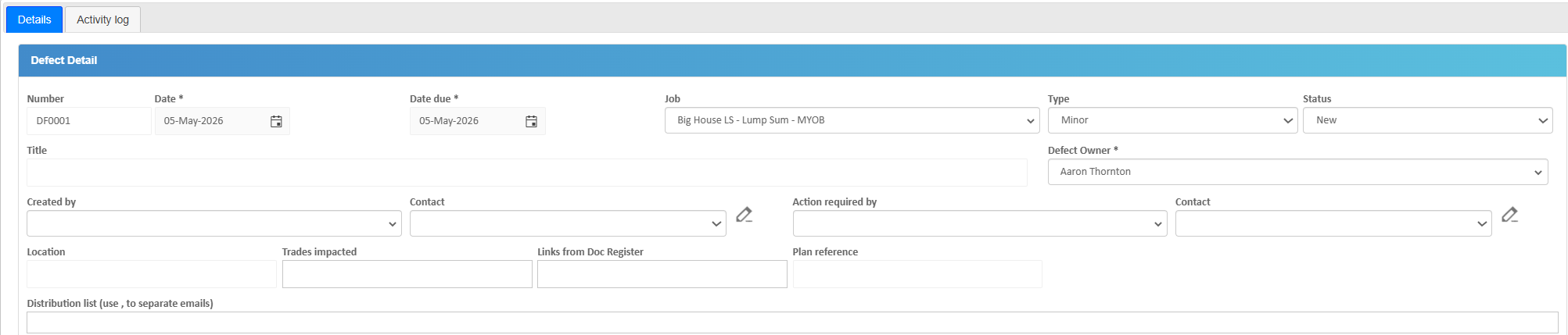
Details Tab – Field Definitions
The Details tab is where all core defect information is entered and managed.
- Defect Number – Unique system-generated identifier for the defect.
- Date – The date the defect was identified or logged.
- Due Date – Target date by which the defect must be resolved.
- Type - Type of defect
- Status– Current state of the defect:
- New – Recently created
- In Progress – Being worked on
- Pending – Waiting on action or response
- Closed – Issue resolved
- Title – Short name or summary describing the defect.
- Defect Owner - Buildlogic user who is responsible and will be notified for defect responses
- Created By – The user or organisation that reported the defect.
- Action Required By – The person, subcontractor, or team responsible for fixing the defect.
- Priority – Indicates urgency (e.g. Low, Medium, High, Critical).
- Location – Area, room, or section of the project where the defect exists.
- Location/Trade– Classification of the defect (e.g. Electrical, Plumbing, Finishes).
- Links from Doc Register - Allows a user to link document register documents from the job to be sent with the defect
- Plan Reference - Indicate where or which plan the defect is related to
- Distribution List - Any additional recipients the user needs to copy in on the defect for response
These fields define the complete lifecycle, ownership, and resolution tracking of the defect.
Attachments/Files
The Attachments tab is used to store supporting documents.
- Upload defect photos
- Attach drawings or plans
- Store reports or inspection documents
- Download uploaded files
Attachments help provide visual evidence and supporting information for defects.
Activity Log Tab
The Activity Log tab tracks all changes.
- Logs status updates
- Tracks assignment changes
- Records edits to defect details
- Captures timestamps and user actions
This provides a complete audit trail for accountability and compliance.
Defect Workflow Context
- Identify and log defect
- Assign responsible party
- Track progress and updates
- Verify fix
- Close defect
This workflow ensures quality control throughout the project lifecycle.
Tips
- Include clear descriptions and photos
- Assign responsibility immediately
- Set realistic due dates
- Update status regularly
- Use Activity Log for audit tracking
Was this article helpful?
That’s Great!
Thank you for your feedback
Sorry! We couldn't be helpful
Thank you for your feedback
Feedback sent
We appreciate your effort and will try to fix the article