Import File Page Guide
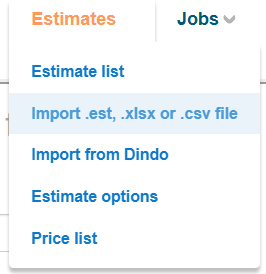
This page allows you to import estimate data into Buildlogic using supported file formats. It also provides access to the main system navigation, tools, and quick actions. Format is important when importing, some symbols can cause issues with CSV, just enter plain text for a value rather than using $ symbols before the number for example. Cost and reference codes should be code only, no description necessary.
Import File Function
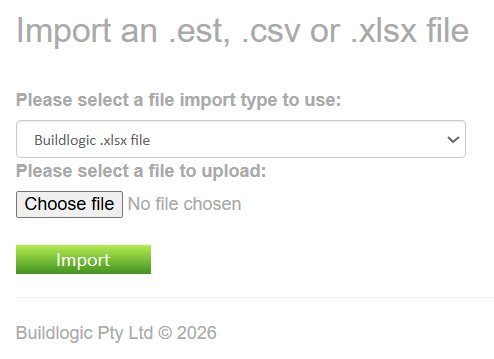
Use this section to upload estimate files into the system.
- Select an import format from the dropdown list
- Choose a file from your device
- Click Import to upload
Supported File Types
| Type | Description |
|---|---|
| Buildlogic CSV | Standard Buildlogic import format (attached below) |
| .EST File | Legacy Buildlogic estimate file (outdated) |
| Buildlogic Excel (.xlsx) | Exported Buildlogic workbook (same format as "export to excel" button from estimate detail tab) |
| CostX Excel | Import from CostX system |
| Build Exact Excel | Import from Build Exact format |
Was this article helpful?
That’s Great!
Thank you for your feedback
Sorry! We couldn't be helpful
Thank you for your feedback
Feedback sent
We appreciate your effort and will try to fix the article